

Safe, secure and confidential

Support groups

Weight loss tracking

Secure & confidential
What is the weight management support app?
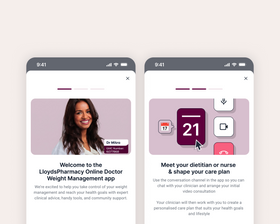
The LloydsPharmacy Weight Management app is a service that provides support to patients on their weight loss journey. Powered by Roczen, this app offers clinician support, advice and community support. Patients can opt in during the consultation process (though it is not essential). Eligible Online Doctor patients can choose to access the Roczen support app at no additional cost.
How do you get the app?
If you have signed up to the weight management support app, you can access:
- Unlimited messaging and monthly 1-to-1 calls with experienced clinicians
- 24/7 Companion AI Support, helping you to find recipes, articles and information
- Community support groups
- Nutrition advice, exercise & strength videos
- Treatment reminders & side-effect support
How to access the weight management support app

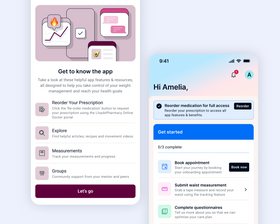
Start consultation
During the consultation you will be offered access to the app.

Download the app
If clinically approved for treatment, you can download the app through a text from Roczen.

Setup your account
Verify your identity, register your details and complete your profile.

Book your sessions
Book an onboarding session with a clinician and answer some introductory questions.
Weight management support app FAQs
-
Who can sign up to the app?
All customers who have successfully completed a weight loss consultation are able to sign up for the weight loss management support app. They will only be offered to join if they have given their consent during the consultation.
-
Do I have to sign up to the app to access weight management treatment?
No, you can access treatment – if clinically appropriate – without using the app.
If you would prefer not to use the app, select ‘No thanks’ during your consultation.
If you change your mind and would subsequently like to sign up to the app, contact us through your account.
-
How long does the programme last for?
To get the most out of the support options offered by the app, it’s recommended that you follow the programme for at least 6 months (though you can choose to leave at any time). This is a long-term commitment to changing lifestyle habits alongside weight loss treatment.
You must have completed a successful Online Doctor consultation to access the app and programme.
-
How do I cancel the programme after I have signed up?
You can contact Roczen directly to request to be withdrawn from the Pharmacy2U Weight Management app and related programme:
- Via Email: support.uk@roczen.com
- Via Web Messenger:
- Visit Roczen.com
- Click the Messenger icon in the bottom-right corner
- Select “Send us a message”
-
What is Roczen?
Roczen is a clinician-led app-based programme to help people with weight management or type 2 diabetes. It offers 1-to-1 support with a clinician who helps shape a tailored care plan with you, while also providing a range of helpful information and features, from articles and recipes to weight and measurement tracking and peer support groups. It is CQC‑regulated and designed to help patients on a weight loss journey, improve metabolic health, and support people with weight management and healthier lifestyle habits.
The LloydsPharmacy Online Doctor weight management support app has been developed in collaboration with our clinical staff and our specialist partners at Roczen.
The app is a LloydsPharmacy Online Doctor branded version of the Roczen platform, offering the same core functionality and features. Where clinically appropriate, you can book a consultation through the Online Doctor portal as part of the clinical process.
All clinical services within the app continue to be delivered solely by Roczen’s qualified clinicians, while LloydsPharmacy Online Doctor provides the patient experience within the app. Roczen clinicians meet all requirements set by their professional bodies and adhere to all relevant professional standards and remote prescribing guidance.
This partnership brings together LloydsPharmacy Online Doctor’s recognised digital healthcare expertise with Roczen’s experience in weight management, designed to support safe, high‑quality care throughout your journey.
Roczen is a healthcare service provided and run by Reset Health Clinics Ltd, registered with the Care Quality Commission (CQC Location ID: 1-27389236869) the independent regulator of healthcare services in England (Location ID: 1-27389236869).
-
What information is shared with Roczen if sign up for the app?
If you consent to joining the programme, the following information will be shared with Roczen:
- Medication information
- First and last name
- Mobile number
- Date of birth
Please make sure your phone number in your LloydsPharmacy Online Doctor account is correct before your next consultation, as this is the number that will be shared with Roczen so that they can send you information on how to download the app and set up your profile.
-
I’ve not received a text message to download the app – what do I do?
You should send us a message from your Account Dashboard.
-
How do I update my phone number?
You need to visit your Account Dashboard to update your phone number:
- Go to 'Account'
- Go to 'Patient Details'
- Update the number in the 'Mobile Number' box
- Click 'Save changes'


